AndaSeat Phantom 4 Review: The Dynamic Lumbar Chair for Long Desk Sessions
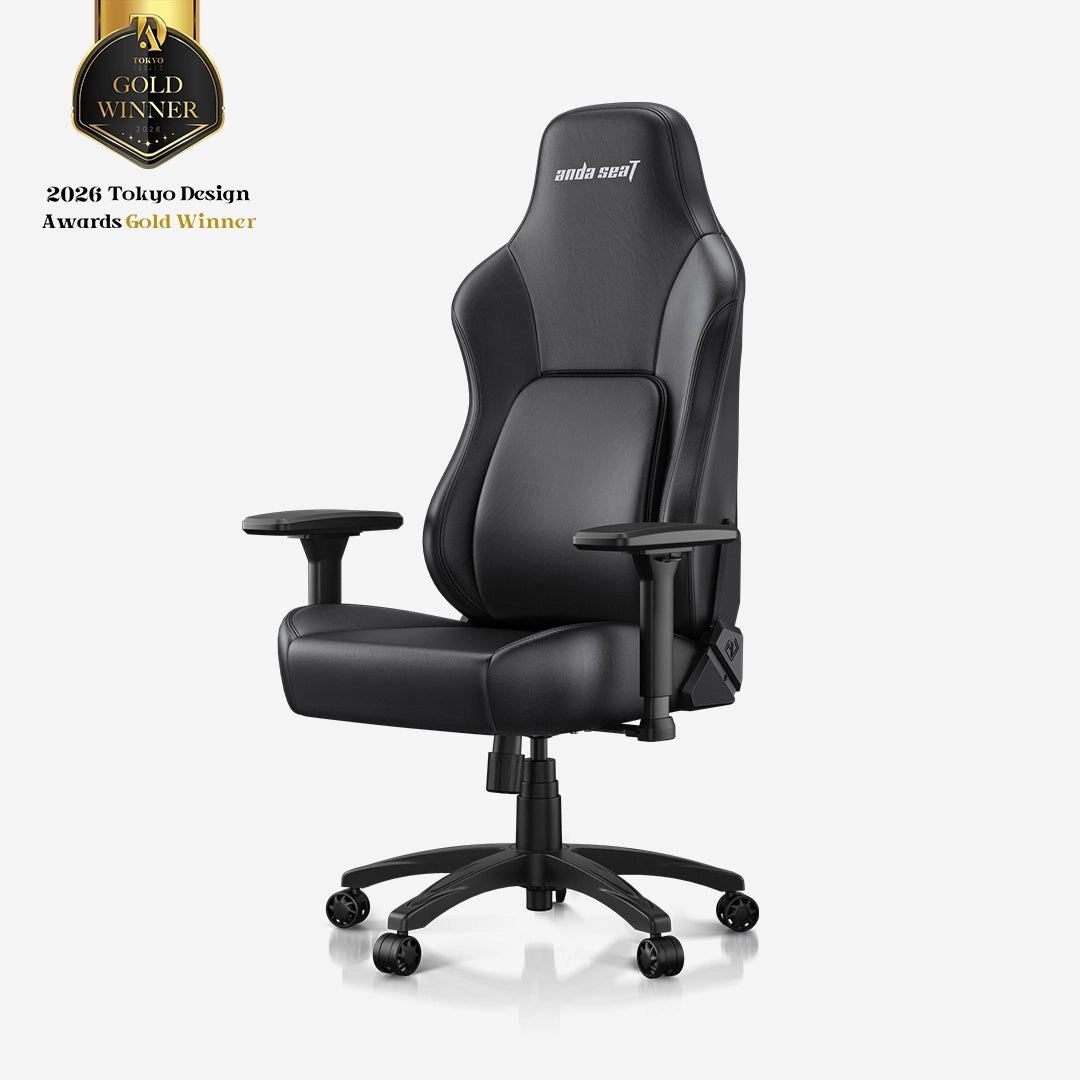
You sit down for a nine-hour work block, then stay for two more hours of gaming. By hour ten, the lower back is the first thing that complains. The AndaSeat Phantom 4 is built specifically for that second-shift fatigue. It is not just a black shell with red stitching; it is an ergonomic chair that focuses on a "dynamic auto-tracking lumbar" system designed to move with your spine rather than staying fixed in one spot.
If you are tired of chairs that look like office surplus but feel like a hard plastic bucket, this is the model to look at. It sits in the mid-range of the AndaSeat lineup, starting around $289, offering a step up in support technology without jumping to the flagship price point. Here is what the official data tells us, who it fits, and how to decide if it is the right chair for your setup.
Quick Answer: AndaSeat Phantom 4
| Category | Detail |
|---|---|
| Best for | Hybrid users (work + play) who need active lumbar support and a modern, non-cluttered aesthetic. |
| Skip if | You prefer a traditional mesh back for maximum airflow, or you are looking for a sub-$200 entry-level seat. |
| One line | A mid-range ergonomic gaming chair that uses a dynamic lumbar system to keep support consistent during long, static sitting sessions. |
Swipe sideways to compare →
What the Official Page Actually Lists
The AndaSeat official product page for the Phantom 4 series highlights specific features that distinguish it from the brand's older models. While exact weight capacities and precise dimensions can vary by specific color variant, the core technical claims from the brand are consistent.
| Feature | Official Claim / Detail |
|---|---|
| Lumbar System | "Dynamic Auto-Tracking Lumbar Support" – designed to adjust and track with the user's movement. |
| Starting Price | From $289 (as listed on the official homepage launch banner). |
| Warranty | 5-year warranty/guarantee on the chair. |
| Positioning | "Made To Move With You" – emphasized as a new launch with superior ergonomic support. |
| Materials | The site notes options for leather (modern/sleek) and fabric/linen (softer/breathable). |
| Payment | Supports flexible payment options including Affirm (interest-free plans starting at ~$83/month). |
Swipe sideways to compare →
Note: Specific weight limits and exact height ranges are listed on the product configuration page. Verify these against your body metrics before ordering, as "ergonomic" fit is highly personal.
Who It's For
The Phantom 4 is not trying to be the cheapest chair on the market, nor is it the most expensive flagship. It occupies a specific niche for people who take their seating seriously but don't want to pay for a corporate-grade mesh chair that looks out of place in a home office.
- The Hybrid Worker/Gamer: You spend the day in spreadsheets and the night in competitive matches. The "dynamic" lumbar is the key here. Static lumbar pillows often dig in or slide down after an hour. This system is designed to maintain contact with your lower back as you shift posture.
- The "Aesthetic vs. Function" Compromise: You want a chair that looks intentional in a modern living space or home office. The Phantom 4 series leans into a cleaner design language compared to the more aggressive, racing-style aesthetics of some older gaming chairs.
- Long-Session Users: If you are sitting for 6+ hours at a time, the 5-year warranty and the focus on ergonomic support make it a lower-risk investment than no-name Amazon chairs that often fail within a year.
Who Should Skip
This chair is not a universal fix for every sitting preference. If you fall into these categories, you might be better served by a different model.
- Strict Mesh Back Lovers: If you run hot and require a full mesh back for airflow, the Phantom 4's primary material themes (leather/fabric) might feel warmer. AndaSeat does have the X-Air series for pure mesh, but that is a different product.
- Budget-Conscious Buyers: At a starting price of $289, this is a mid-tier purchase. If you are looking for a chair under $150, you are looking at a different tier of build quality and support mechanisms.
- Those Who Need Extreme Bulk: If you are significantly above the standard weight/height ranges for ergonomic chairs, verify the specific load rating for your chosen variant. "Ergonomic" chairs often have strict limits that differ from heavy-duty industrial chairs.
Mid-check
If the criteria above already match how you actually use the space, stop here and check current options before you keep reading comparison noise.
How to Choose in Five Minutes
You can compare current options against the criteria above instead of shopping blind.
When you are ready to check stock and return terms, see brand options.
If the criteria already match how you live in the space, see current options before you keep comparing.
You don't need to overthink this. Here is a simple decision framework to see if the AndaSeat Phantom 4 is the right fit for your desk.
- Check Your Sitting Style: Do you sit fairly statically (same posture for long periods) or do you shift a lot? The "auto-tracking" lumbar is best for people who shift slightly but need constant support. If you sit in a fixed, perfect posture, a basic lumbar pillow might suffice, and you could save money.
- Measure Your Space: Gaming and ergonomic chairs are often wider than standard office chairs. Measure your desk depth and width. Ensure the armrests won't clash with your monitor or peripherals.
- Look at the Material: The official site highlights leather for a "modern exterior" and linen/fabric for "breathability." If you are in a warm climate, lean toward the fabric options. If you want a sleek, wipeable surface, look at the leather variants.
- Verify the Warranty: AndaSeat offers a 5-year warranty. This is a significant selling point. Before you buy, confirm the current terms on the brand site, as warranty coverage can sometimes exclude specific parts like gas lifts or armrests.
- Compare with the Kaiser 3: If you are already familiar with the AndaSeat Kaiser line (their best-seller), the Phantom 4 is the newer, more dynamic option. If you just want a solid, traditional ergonomic chair, the Kaiser might be more familiar. If you want the "moving" support, go Phantom 4.
FAQ
Is the AndaSeat Phantom 4 better than a standard office chair? For hybrid use, yes. Standard office chairs often have fixed lumbar support. The Phantom 4 uses a dynamic system that is designed to track your movement. If you are only sitting for 2-3 hours a day, a standard office chair is fine. If you are sitting for 8+ hours, the dynamic support is a significant upgrade in comfort.
Does the "dynamic lumbar" require batteries or electricity? No. The "auto-tracking" refers to the mechanical design of the lumbar support system that allows it to adjust and maintain contact with the spine as you move. It is a passive mechanical feature, not an active electronic one.
How does the Phantom 4 compare to the AndaSeat Kaiser 3? The AndaSeat Kaiser 3 is the brand's long-standing best-seller and the "ergonomic standard." The Phantom 4 is a newer launch that emphasizes "dynamic" movement and a slightly different aesthetic. If you prefer the tried-and-true feel of the Kaiser, stick with that. If you want the newer technology and design, the Phantom 4 is the step forward.
What is the warranty on the AndaSeat Phantom 4? AndaSeat offers a 5-year warranty on their chairs. This is a strong guarantee that covers the chair against defects. Always check the specific exclusions (like wear and tear on fabric) on the official site before purchasing.
Is assembly difficult? Like most chairs, it is a standard assembly process. You will need to attach the armrests, backrest, and base. It is not a "40-step nightmare," but it is not a "no-assembly" product either. Plan for about 20-30 minutes with a second person if possible.
If the FAQ answered your main objections and you want current models or trial terms, see brand options.
Bottom Line
The AndaSeat Phantom 4 is a strong choice for anyone who is done with chairs that feel like they are just "holding you up" rather than "supporting you." The dynamic lumbar system is the headline feature, and for long work-and-play sessions, it addresses the most common complaint: lower back fatigue in the second half of the day.
It is not the cheapest option, and it is not the most premium. But it sits in the sweet spot where you get real ergonomic technology, a modern look, and a 5-year warranty without paying flagship prices. If you are upgrading from a cheap office chair or a worn-out gaming chair, this is a logical next step.
Some links on this page may be affiliate links. We may earn a commission if you buy through them, at no extra cost to you.
Related Guides:
AndaSeat for work + play setups
- Hybrid gaming/work aesthetic options
- Clear model lineup
- Better than mystery marketplace chairs
Who should skip
- · You want pure mesh corporate look only
- · Your room can't fit a larger chair