Hohem Isteady MT2 Camera Gimbal Review: 3-Axis Stabilization for Mirrorless and DSLR
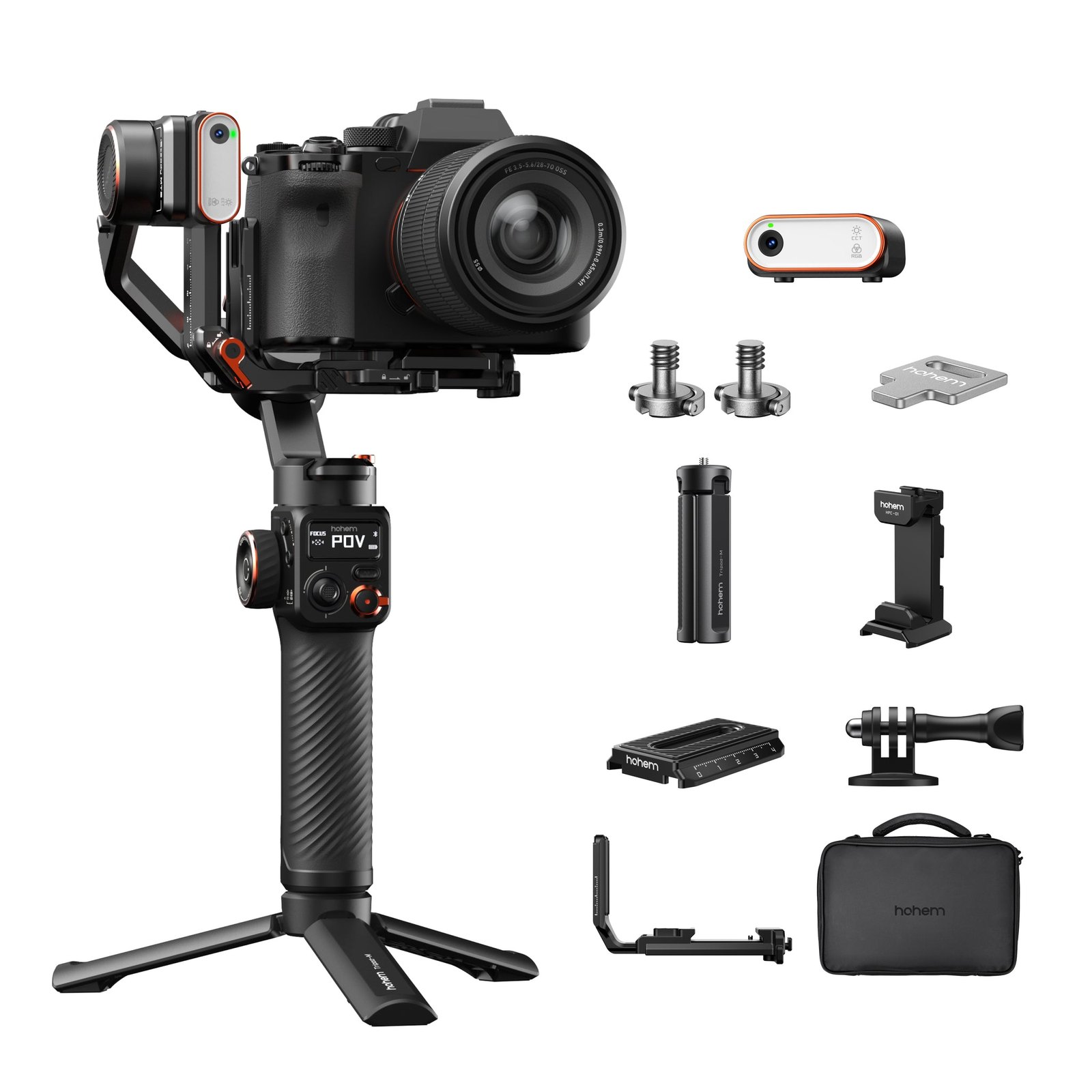
You’re holding a mirrorless body that’s heavy enough to make your wrists ache after twenty minutes of handheld shooting, and every step you take turns your footage into a shaky mess. The Hohem Isteady MT2 Camera Gimbal is built for exactly that scenario: a three-axis stabilizer that takes the weight off your arms while keeping your horizon level and your subject in frame. It’s not a phone clip or a lightweight travel gadget—it’s a tool for creators who shoot with actual camera bodies, not just smartphones.
If you’re searching for the Hohem Isteady MT2 Camera Gimbal, you likely already know you need more than a basic handheld stabilizer. This page walks through what the official product page actually lists, who this gimbal fits, and where it might not be the right call.
Quick Answer: Hohem Isteady MT2 Camera Gimbal
| Best for | Creators shooting with mirrorless or DSLR bodies who want 3-axis stabilization, Arca-Swiss compatible quick-release mounting, and vertical-mode flexibility without swapping to a phone-only gimbal. |
| Skip if | You only shoot on a smartphone and need a compact, pocket-sized stabilizer, or you require a gimbal with a significantly higher payload for full-frame cinema bodies. |
| One line | A mid-tier, Arca-Swiss-based 3-axis camera gimbal that prioritizes quick device switching and ergonomic handling for dedicated camera users. |
Swipe sideways to compare →
What the Official Page Actually Lists
The Hohem Isteady MT2 product page highlights a specific set of features that differentiate it from Hohem’s smartphone-focused lineup. Here’s what’s confirmed on the official destination page:
| Feature | Detail from Official Page |
|---|---|
| Axis Count | 3-axis stabilization (pan, tilt, roll) |
| Quick-Release System | Multi 4.0 Quick Release System, based on the Arca-Swiss standard |
| Mounting Hardware | Detachable L-bracket included for swift device switching |
| Vertical Shooting | Supported via the detachable L-bracket design |
| Device Compatibility | Designed for mirrorless and DSLR camera bodies (not phone-only) |
Swipe sideways to compare →
The official page emphasizes the Arca-Swiss compatibility as a core design choice. This matters if you already own Arca-Swiss plates, L-brackets, or quick-release clamps from other brands—you can reuse them without buying Hohem-specific accessories. The detachable L-bracket also means you can flip the gimbal into vertical orientation for social-first content without re-rigging the entire setup.
For exact payload limits (in grams or kilograms), motor torque specs, battery life, and firmware update details, verify the current numbers on the Hohem official store, as these can vary by firmware version and regional SKU.
Who It’s For
The MT2 sits in a specific niche: you have a real camera body, you shoot video regularly, and you’re tired of the trade-off between stabilization and portability.
- Travel and event videographers who need to switch between a mirrorless body and a backup camera quickly. The Arca-Swiss quick-release system means you can swap bodies in seconds without re-tightening screws or re-balancing from scratch.
- Content creators who shoot vertical and horizontal for the same event. The detachable L-bracket lets you flip into vertical mode without a separate phone mount or adapter.
- Users already invested in Arca-Swiss accessories. If your L-brackets, plates, and clamps follow the Arca-Swiss standard, the MT2 integrates into your existing kit without forcing a new accessory ecosystem.
- Creators who want a dedicated camera gimbal rather than a phone gimbal with a camera adapter bolted on. The MT2 is designed around camera-body ergonomics, not phone form factors.
Who Should Skip
Not every stabilizer need is a camera-gimbal problem. If your workflow doesn’t match the MT2’s design, you’ll be paying for features you won’t use.
- Smartphone-only shooters. If you don’t own a mirrorless or DSLR body, the MT2’s payload capacity and mounting system are overkill. Hohem’s smartphone-focused line, including the Mobile 7 (M7) or the Mobile 6 (M6), is lighter, more compact, and cheaper for phone-only work.
- Full-frame cinema body users with heavy lenses. If your typical setup includes a full-frame body plus a 70-200mm f/2.8 or heavier, verify the MT2’s payload limit against your total rig weight before buying. Exceeding the rated payload degrades stabilization and shortens motor life.
- Creators who need a pocket-sized travel stabilizer. The MT2 is a handheld gimbal, not a fold-to-pocket device. If you’re constantly packing light and shooting on the go with a phone, a compact phone gimbal will serve you better.
- Users who want a tripod-integrated gimbal system. If your workflow centers on locked-off shots with occasional movement, a gimbal head on a tripod (like the Hohem H58 Camera Tripod ecosystem) may be more practical than a dedicated handheld gimbal.
Mid-check
If the criteria above already match how you actually use the space, stop here and check current options before you keep reading comparison noise.
How to Choose in Five Minutes
If you’re on the fence about the Hohem Isteady MT2 Camera Gimbal, run through this checklist before you buy:
- Check your heaviest typical rig. Add up your camera body + lens + microphone + any accessories. Compare that total to the MT2’s listed payload on the official product page. If you’re within 80% of the max, you’re in the safe zone. If you’re at or over 100%, look at a higher-payload gimbal.
- Audit your Arca-Swiss gear. If you already own Arca-Swiss plates and L-brackets, the MT2’s Multi 4.0 system is a direct fit. If you don’t, factor in the cost of the included L-bracket and whether you’ll actually use the quick-release feature or just mount directly.
- Decide if vertical shooting is a real need. If you post to Instagram Reels, TikTok, or YouTube Shorts regularly, the detachable L-bracket’s vertical mode saves you from buying a separate phone gimbal. If you only shoot 16:9, the L-bracket is a nice-to-have, not a dealbreaker.
- Compare against your current stabilization method. If you’re already using a high-end in-body IBIS camera and a cheap handheld stabilizer for occasional shoots, the MT2’s value depends on how often you shoot video. For daily video work, the upgrade makes sense. For monthly shoots, it may not.
- Read the latest firmware notes. Hohem regularly updates gimbal firmware to improve motor response and add features. Check the Hohem support page for the current firmware version and any known issues before purchasing.
For a broader look at how different gimbal types compare, see our guide to choosing a camera gimbal for your workflow and our breakdown of stabilization options for travel videography.
FAQ
Does the Hohem Isteady MT2 work with smartphones? The MT2 is designed primarily for mirrorless and DSLR camera bodies. While you can physically mount a smartphone, the payload capacity and motor tuning are optimized for camera bodies. For phone-only shooting, the Hohem Mobile 7 (M7) or Mobile 6 (M6) are better-matched in size, weight, and price.
Is the Arca-Swiss quick-release system compatible with third-party plates? Yes. The Multi 4.0 Quick Release System is based on the Arca-Swiss standard, so it accepts Arca-Swiss plates and L-brackets from other manufacturers. This is a significant advantage if you already own Arca-Swiss-compatible accessories.
What’s the difference between the MT2 and the MT3? The isteady MT3 is a newer model in Hohem’s camera gimbal lineup. The MT2 remains available and is typically priced lower. Check the Hohem official store for current pricing and any feature differences between the two models, as Hohem’s product descriptions and availability can shift.
Does Hohem offer a warranty or return window for the MT2? Hohem typically includes a warranty and return policy on its products, but the specific terms (duration, coverage, return window) can vary by region and retailer. Confirm the current warranty and return terms directly on the Hohem product page before purchasing, as these policies are updated periodically.
Can I use the MT2 for both horizontal and vertical video? Yes. The detachable L-bracket allows you to switch between horizontal and vertical orientations. This is particularly useful if you shoot for both traditional platforms (YouTube, broadcast) and social-first platforms (Reels, TikTok) in the same session.
Bottom Line
The Hohem Isteady MT2 Camera Gimbal is a purpose-built stabilizer for creators who shoot with actual camera bodies and want the flexibility of Arca-Swiss-compatible quick-release mounting. It’s not the lightest or most compact gimbal on the market, and it’s not designed for phone-only workflows. But if your typical rig includes a mirrorless or DSLR body, you value quick device switching, and you want a gimbal that integrates with your existing Arca-Swiss accessories, the MT2 fills a specific and useful gap in your kit.
Verify the current payload specs, firmware version, and warranty terms on the Hohem official store before you buy, and make sure your heaviest typical rig fits comfortably within the rated limits.
Some links on this page may be affiliate links. We may earn a commission if you buy through them, at no extra cost to you.