Hohem Kit 3 Review: What the Upgraded 3-Axis Design Actually Does
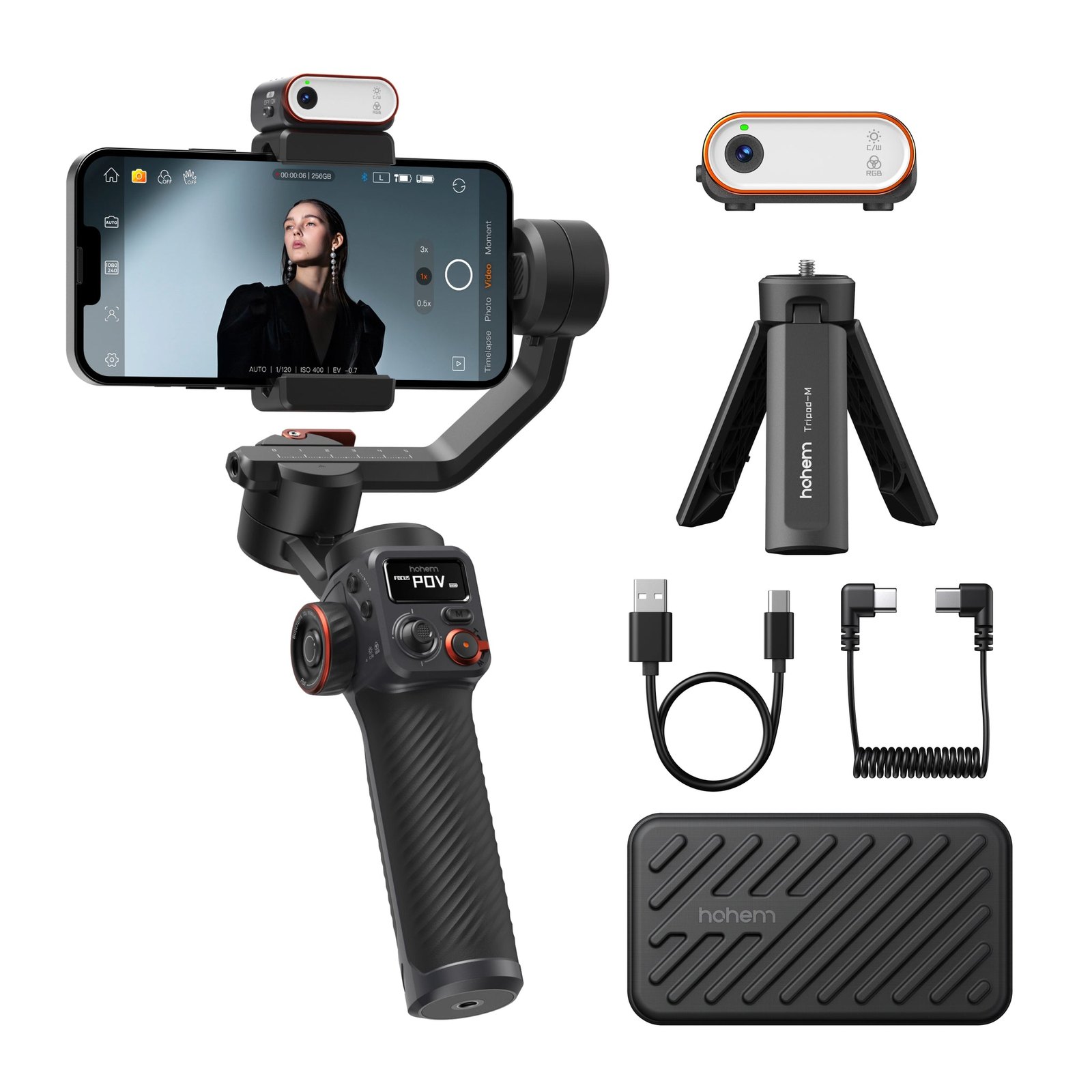
If you shoot video on a phone or small camera and hate the way your footage jitters when you walk, the Hohem Kit 3 is built to kill that shake. It’s a 3-axis smartphone gimbal that Hohem has updated with a "dual-sided power-on" feature, meaning the motor spins up whether your phone is mounted in front of or behind the roll motor. That small change removes a common frustration: you can flip the phone for a wider angle or a different framing without fumbling with settings or losing stabilization. The kit also adds dedicated A-B motion buttons, so you can set start and end points for timelapse shots without pulling out your phone or connecting Bluetooth. It’s a tool for people who want smooth, cinematic movement without carrying a heavy rig.
Quick Answer: Hohem Kit 3
| Best for | Smartphone creators who want 3-axis stabilization, easy power-on in any orientation, and built-in A-B motion timelapse controls. |
| Skip if | You shoot exclusively on a DSLR/mirrorless body that exceeds the gimbal’s payload, or you don’t care about stabilizing handheld video. |
| One line | A phone-centric 3-axis gimbal with a clever dual-sided power-on and dedicated motion buttons for app-free timelapse. |
Swipe sideways to compare →
What the Official Page Actually Lists
Hohem’s product page for the Hohem iSteady M6 Kit highlights a few specific upgrades over earlier models. Here’s what’s stated:
| Feature | Detail from Official Page |
|---|---|
| Axis count | 3-axis (pitch, roll, yaw) |
| Power-on behavior | Dual-sided: gimbal activates whether phone is in front of or behind the roll motor |
| A-B Motion | Dedicated buttons for setting motion timelapse start/end points; no app or Bluetooth required |
| Use case emphasis | Ultra-wide-angle shots, motion timelapse, general stabilized video |
| Related models mentioned | Hohem M6, Hohem Joy |
Swipe sideways to compare →
The page does not list a specific payload weight limit, battery life in hours, or exact dimensions in the fetched content. If those numbers matter to your workflow, verify the current payload capacity and battery runtime on the brand’s product page before ordering, as specs can vary by region or firmware update.
Who It’s For
The Hohem Kit 3 is aimed at creators who shoot on a phone or a very light camera and want stabilization without the complexity of a full-size gimbal. It’s a good fit if you:
- Shoot vlogs, travel content, or product videos on a smartphone and want to eliminate handheld shake.
- Like to flip your phone between portrait and landscape, or front and back, without losing stabilization or having to re-pair a remote.
- Use motion timelapse (e.g., panning across a scene from point A to point B) and want to trigger it with physical buttons rather than tapping through an app.
- Prefer a compact, phone-first tool over a heavier camera gimbal that requires more setup.
If you’re a solo creator or a small team that values quick setup and consistent smoothness over raw payload capacity, this is the kind of tool that fits into a daily shooting routine.
Who Should Skip
The Hohem Kit 3 is not the right tool if your workflow centers on heavier glass or larger camera bodies. It’s a phone gimbal first, and the design choices—like the dual-sided power-on and app-free A-B buttons—are optimized for that use case. You might look elsewhere if:
- You regularly shoot on a mirrorless or DSLR body with lenses that push past a lightweight payload.
- You need advanced features like full wireless remote control with extensive app-based motion paths, or you shoot in environments where a phone gimbal’s size is a limitation.
- You don’t shoot video at all, or you only take stills. A gimbal won’t help with static photography.
In those cases, a heavier-duty gimbal or a different stabilization method may serve you better.
Mid-check
If the criteria above already match how you actually use the space, stop here and check current options before you keep reading comparison noise.
How to Choose in Five Minutes
If you’re deciding whether the Hohem Kit 3 fits your needs, here’s a quick checklist:
- Confirm your device weight. Check the payload limit on the current product page. If your phone plus case and any accessories come in under that limit, you’re good. If you’re on the edge, consider a lighter case or no case.
- Think about your shooting orientation. If you frequently flip your phone for wide-angle shots or switch between front and back cameras, the dual-sided power-on is a real convenience. If you always mount the phone the same way, this feature matters less.
- Consider your timelapse habits. If you shoot motion timelapse often and hate pulling out your phone to set start/end points, the A-B buttons save time. If you rarely do timelapse, it’s a nice-to-have rather than a dealbreaker.
- Check the current lineup. Hohem also offers the Hohem M6 and Hohem Joy. Compare what’s included in each kit (batteries, cases, accessories) and which features you actually need. The Kit 3 branding suggests a bundled or upgraded configuration, but verify what’s in the box on the product page.
- Look at the current price and warranty terms. Prices and warranty lengths can shift. Confirm the current offer and return policy before you buy.
Frequently Asked Questions
Does the Hohem Kit 3 work without an app? Yes, for basic stabilization and A-B motion timelapse. The dedicated buttons let you set start and end points for motion timelapse without connecting Bluetooth or opening an app. For more advanced controls or firmware updates, an app is likely required.
Can I use it with any phone? It’s designed for smartphones. The key constraint is weight and dimensions. Verify the current payload limit on the product page and compare it to your phone’s weight (including case). If your phone is within spec, it should mount and stabilize correctly.
What’s the difference between the Hohem Kit 3 and the Hohem M6? The Kit 3 appears to be a bundled or upgraded configuration of the iSteady M6 platform. The official page emphasizes the dual-sided power-on and A-B motion buttons as key features. Check the product page for the exact contents of the Kit 3 box versus the standalone M6 to see what’s included.
Is there a warranty? Hohem typically offers a limited warranty on its products. The exact length and terms can vary by region and time. Confirm the current warranty details on the brand’s support or product page before purchasing.
Can I use it for wide-angle shots? Yes. The dual-sided power-on feature is specifically called out for making ultra-wide-angle shots easier, since you can mount the phone in front of or behind the roll motor without losing stabilization.
Bottom Line
The Hohem Kit 3 is a focused, phone-first 3-axis gimbal that solves two specific pain points: it powers on regardless of which side of the roll motor your phone is on, and it gives you physical buttons for A-B motion timelapse. If you shoot video on a smartphone and want smooth, shake-free footage without the bulk of a camera gimbal or the friction of app-based controls for basic tasks, it’s a practical choice. It won’t replace a heavy-duty gimbal for mirrorless bodies, but for its intended use case, the design choices make sense.
Some links on this page may be affiliate links. We may earn a commission if you buy through them, at no extra cost to you.
Related guides: